The life of a designer is a life of fight:
fight against the ugliness.
— Massimo Vignelli
Modelling the cost of typing your own name
My role
Design and build, solo
Output
Chrome extension
Problem Statement
Applying for jobs means retyping the same twelve facts about yourself into a different form every time. Greenhouse, Lever, Workday and LinkedIn Easy Apply all ask for the same things in different shapes. Browser autofill handles name and email, then gives up on Current CTC, Notice Period and "How many years of work experience do you have using Figma?"

What I built
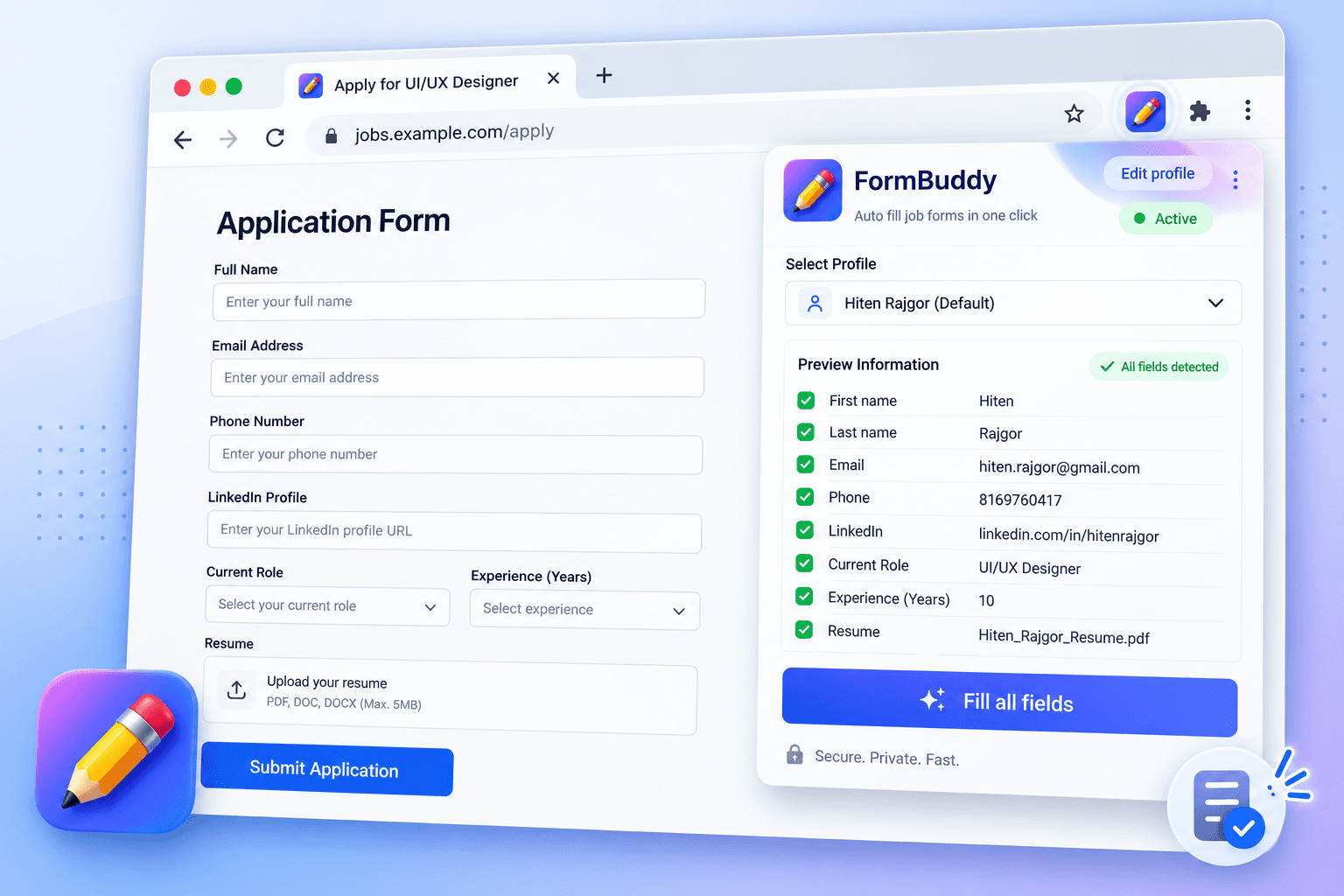
FormBuddy saves your profile once, reads the form on the page you are looking at, matches its fields against what you have saved, and fills them. It requests no site access in advance and touches only the tab you invoke it on.
The privacy model was a design constraint, not a footnote. An autofill tool asks you to hand it your phone number, address and salary, so it has to earn that in ways you can check.
Everything stays on your machine. The profile lives in chrome.storage.local, a device-local store. Not a server, because there isn't one. Not Chrome Sync either, so it does not travel between your own devices unless you put it there. The extension makes zero network requests of any kind, and ships with no analytics, telemetry or third-party SDKs. Its fonts and images are bundled in the package rather than pulled from a CDN, so even loading the UI phones nobody.
No website can read it. Extension storage is isolated from page JavaScript, so a tab you have open cannot reach in and read your saved profile. The only values a site ever sees are the ones you deliberately filled into its own form.
No standing access to any site. FormBuddy requests no host permissions at all. It uses Chrome's activeTab, which grants access to a single tab at the moment you click the toolbar button and revokes it afterwards.
There is no background script watching your browsing, and nothing runs on a page until you invoke it there.
The tradeoff is real and I took it deliberately: no persistent content script means no automatic fill on page load, so every fill costs one click. I would rather charge that click than ask for permission to watch every tab.

Measuring the difference
Method used - Keystroke level modeling
I wanted a defensible number rather than a claim. The Keystroke-Level Model decomposes a task into primitive operators with empirically established durations, so two interaction paths can be compared without running a study. It also forced me to be precise about what the tool actually removes, which turned out to be mostly mental retrieval, not typing.
Operators used, from Card, Moran and Newell: K keystroke, P point with mouse (1.10s), B button press (0.10s), H home hands to keyboard (0.40s), M mental preparation (1.35s), R system response. M placement follows Kieras' heuristics, one per cognitive chunk.
Baseline: seven fields, typed by hand
I modelled the fastest realistic manual path, keyboard-navigated with Tab rather than clicking each field, so the saving is a floor rather than a flattering number.
Field
Value modelled
Keystrokes
First name
Hiten
5 + 1 shift
Last name
Rajgor
6 + 1 shift
hiten.rajgor@gmail.com
22 + 1 shift
Mobile
9876543210
10
City
Mumbai
6 + 1 shift
Current CTC
1800000
7
Expected CTC
2400000
7
67 keystrokes, plus 6 Tabs, plus one H + P + BB to enter the first field, plus 7 M operators for retrieving each value.
At K = 0.20s (average skilled typist, 55wpm): 25.75s
The FormBuddy path
M (decide to use it) + P + BB (toolbar icon) + R (popup renders and scans) + P + BB (Fill all fields) + R (fill executes) = 4.95s
Constant, regardless of how many fields the form has.
Result
20.80 seconds saved per form, an 80.8% reduction.
Sensitivity across typing speeds, since K is the only operator the user varies:
Typist
Manual
Saved
Reduction
Good, 90wpm
19.91s
14.96s
75.1%
Average skilled, 55wpm
25.75s
20.80s
80.8%
Average, 40wpm
31.59s
26.64s
84.3%
The saving holds above 75% across the whole range. It grows with field count, because the manual path scales linearly while FormBuddy's is flat.
What the model does not capture
KLM measures error-free expert execution. It excludes typos and corrections, tab-switching to look up your CTC, re-reading a label you misparsed, and the friction of abandoning an application halfway. Those are where the real cost sits, and they compound over a job search rather than adding up linearly.
It also flatters the manual path in one specific way: seven fields is a floor, not a typical form. LinkedIn Easy Apply routinely adds five to ten screening questions on top.
And the honest headline: 30 applications saves about ten minutes. That is not the point. The point is that 9.45 of the 25.75 seconds, over a third, is pure mental retrieval, and that is the part that makes people put the application off until tomorrow.
Where it falls down
The 4.95s path assumes a successful scan. It does not always get one.
Fields with no readable label. Matching runs on whatever text a form associates with an input: a <label for>, an aria attribute, a placeholder, a fieldset legend, nearby wrapper text. Forms that label fields purely by visual position, or by an icon, give it nothing to match on. There is no fallback, and there shouldn't be. Guessing at an unlabelled field is how you put a phone number in a salary box.
Enterprise ATS components. Workday and similar build inputs as heavily wrapped custom components with their own internal state, which often reject a programmatic value or silently revert it. FormBuddy detects these and flags the fill as needing review instead of claiming a success it can't verify.
Controls it deliberately won't touch. Checkboxes are excluded outright, because consent and agreement boxes should be yours to tick. Radio groups are filled only when an option's own label matches a saved value, so a Yes/No screening question is answered from your profile rather than guessed at.
Slow and staged forms. Easy Apply renders its fields across a multi-step modal, so the scan has to wait for a step and be re-run after each one. That turns the flat 4.95s into 4.95s per step. The single-invocation number holds for single-page forms, which is most of Greenhouse and Lever, and degrades gracefully rather than breaking.
The consistent principle is that the tool reports what it could not do rather than quietly failing. Every unfilled match surfaces in the popup as "pick manually", because a silent miss on a salary field is worse than no autofill at all.
Other Projects

Fleet Monitoring System
We designed a platform that consolidated competitor tracking, market share trends, and sales performance into one workspace, giving teams a clear read on where they were winning, where they were losing ground, and why.
Password Protected



Video Telematics System
Designed an intelligent video telematics experience that leverages in-cabin and on-road smart dashcams to identify unsafe driving events, deliver timely interventions, and help fleets build safer driving habits.
Password Protected
